Craftsman is a household name trusted for its durable and reliable tools, and their garage door openers are no exception. For millions aof homeowners, the simple press of a button on a Craftsman garage door opener remote provides secure and effortless access to their homes. But what happens when that button stops working? A malfunctioning remote can be more than just an inconvenience; it can disrupt your daily routine and even compromise your home’s security.
Understanding how your remote works is the first step toward keeping your garage accessible and secure. Whether you’re dealing with a new remote that needs programming, an old one that’s acting up, or considering an upgrade, this guide has you covered. We will walk you through everything from the basic technology behind Craftsman remotes to step-by-step programming instructions, common troubleshooting fixes, and advanced security features. By the end of this article, you’ll have the knowledge to manage your Craftsman remote control with confidence.
Understanding Your Craftsman Remote
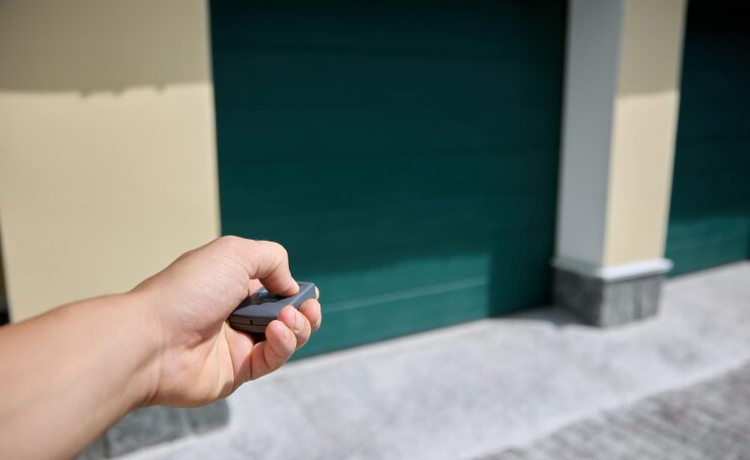
A Craftsman garage door opener remote is a small handheld transmitter that sends a radio frequency (RF) signal to a receiver in your garage door opener motor unit. When the receiver gets the correct signal, it activates the motor to open or close the door. Craftsman offers several types of remotes to fit different needs, including compact handheld remotes that fit on a keychain, larger visor remotes that clip onto your car’s sun visor, and multi-door remotes designed to control up to three different garage doors.
These remotes operate on specific frequencies, most commonly 315 MHz or 390 MHz. For the remote to work, its frequency must match that of your garage door opener. Modern Craftsman remotes also use “rolling code” technology. This security feature changes the access code every time you use the remote, sending a new, unique code from billions of possible combinations. This makes it nearly impossible for anyone to intercept your signal and gain unauthorized access to your garage. Understanding these basics is key to ensuring garage door opener remote compatibility and troubleshooting any issues that may arise.
How to Program a Craftsman Remote
Programming a Craftsman garage door opener remote is a straightforward process that usually takes only a few minutes. Most Craftsman openers use a “Learn” button, which is typically a square button located on the motor unit in your garage, often near the antenna wire. The color of this button (purple, red, orange, green, or yellow) is important, as it indicates the type of technology your opener uses.
To begin programming, press and release the “Learn” button on the motor unit. The indicator light next to it will glow steadily for about 30 seconds. During this time, press and hold the button on your remote control that you wish to use. Continue holding the remote button until the lights on the garage door opener blink or you hear two clicks. This confirms that the remote has been successfully programmed. Release the button and press it again to test it; the garage door should now move. If you’re programming multiple remotes, simply repeat the process for each one. Should you encounter issues, like the light on the opener not responding, ensure you are within range and that the remote’s battery is fresh. Following this Craftsman remote programming guide will solve most setup issues.
Sometimes, you may need to reprogram your remote. This is common after changing the battery in the remote, if you’ve recently experienced a power outage, or if the remote seems to have lost its signal. Reprogramming is also a necessary security measure if a remote is lost or stolen, as clearing the opener’s memory and reprogramming the remaining remotes will prevent the lost one from being used.
Troubleshooting Common Remote Issues
Is your Craftsman remote not working? It’s a common frustration, but the cause is often a simple fix. The first thing to check is the battery. A weak or dead battery is the most frequent reason a remote fails. If a new battery doesn’t solve the problem, the issue could be signal interference or range. Metal objects, LED light bulbs, and other electronic devices can disrupt the RF signal. Ensure the garage door opener’s antenna is hanging straight down and is not damaged or blocked.
If the remote works intermittently or only at very close range, you might be dealing with range issues on your Craftsman remote. Try moving objects away from the opener unit and check the antenna’s condition. Sometimes, the remote may simply need to be resynced with the opener. Follow the programming steps again to re-establish the connection. If the remote works but the door doesn’t close, check the safety sensors at the bottom of the door tracks. If they are misaligned or obstructed, the door won’t close as a safety precaution. When one remote works and another doesn’t, the problem is likely with the non-functional remote itself. However, if no remotes are working, the issue may lie with the opener’s receiver logic board. This Craftsman remote troubleshooting approach helps isolate and fix the problem efficiently.
Choosing the Right Craftsman Remote
If you need a Craftsman remote replacement, compatibility is the most important factor. You must match the new remote to your garage door opener’s model and frequency. The easiest way to do this is to find the model number on your opener motor unit and check its manufacturing date. The color of the “Learn” button is also a reliable indicator of the technology your opener uses. For example, a red or orange “Learn” button typically corresponds to Security+ technology operating at 390 MHz, while a purple button uses Security+ at 315 MHz.
When selecting a replacement, consider what features you need. A simple 1-button remote is great for a single garage door, while a 3-button remote offers multi-door Craftsman remote control, allowing you to operate multiple openers with one device. If you have different brands of garage door openers, a universal garage door remote for Craftsman might be the perfect solution. These remotes are designed to work with most major brands and opener technologies made after 1993. Before purchasing a universal remote, always verify its compatibility with your specific Craftsman model to avoid any setup headaches.
Security Features of Craftsman Remotes
Modern Craftsman garage door opener remotes are designed with advanced security in mind. The most significant of these is rolling code technology. As mentioned earlier, this system generates a new, unique security code each time you use the remote. This Craftsman rolling code security feature effectively blocks code-grabbing devices used by thieves, providing peace of mind that your garage is secure. When your opener receives a signal, it checks if the code is the next one in the sequence. If it is, the door opens. If not, the signal is ignored.
In addition to rolling codes, many Craftsman systems include a “Lock” or “Craftsman vacation mode” feature. This function is typically activated by a switch on the wall control panel inside your garage. When engaged, it deactivates all remote control signals, meaning the door cannot be opened with any remote. This is an excellent security measure to use when you’re away from home for an extended period, ensuring that no one can open your garage door while you’re gone. To use the door again, you simply need to disengage the lock mode from the wall panel. These Craftsman remote security features work together to create a robust system that protects your home from unauthorized entry.
Also Check: “dehumidifying a garage“
Your Next Steps for a Working Remote
Your Craftsman garage door opener remote is the key to convenient and secure access to your home. By understanding how to program it, troubleshoot common problems, and choose the right model, you can ensure it works flawlessly for years to come. Regular maintenance, like checking the batteries and keeping the opener’s antenna clear, can prevent most issues before they start.
Ensure your Craftsman remote works smoothly by following the steps outlined in this guide. If you’re still having trouble after trying these fixes, it might be time to consider upgrading to a newer remote or reaching out for professional support to inspect your garage door opener system.
Frequently Asked Questions (FAQs)
Why won’t my Craftsman garage door remote open the door?
There are several common reasons for this issue. First, check the remote’s battery, as a weak battery is the most frequent cause. Second, ensure you are within range and that there is no signal interference from other electronics or large metal objects. Third, check the garage door opener’s antenna to make sure it’s hanging straight down and isn’t damaged. Finally, the remote may need to be reprogrammed to the opener unit.
How do I program a Craftsman garage door opener remote?
Press and release the “Learn” button on the back of the garage door opener motor unit. The indicator light will glow for 30 seconds. Within that time, press and hold the button on your remote. Release the button when the opener’s lights blink or you hear two clicks. Test the remote to confirm it’s programmed.
What should I do if my Craftsman remote stops working suddenly?
Start by replacing the battery. If that doesn’t work, try reprogramming the remote to the opener. Also, check the lock feature on your wall-mounted control panel; if it’s activated, it will disable all remotes. If the remote still doesn’t work, the issue could be with the opener’s logic board, which may require professional service.
Can I use any remote with my Craftsman garage door opener?
No, you cannot use just any remote. The remote must be compatible with your specific Craftsman model’s frequency and security technology (e.g., Security+, Security+ 2.0). You can determine compatibility by matching the color of the “Learn” button on your opener to the specifications of the new remote. Universal remotes are an option, but you must verify they support your Craftsman opener model before purchasing.
How do I fix range issues with my Craftsman remote?
To fix poor range, start by replacing the remote’s battery. Next, ensure the opener’s antenna is fully extended and not obstructed. Repositioning the antenna slightly may also help. Finally, check for sources of radio frequency interference, such as LED light bulbs in the opener or nearby electronics, and try to eliminate them.
How do I activate the lock mode on my Craftsman remote system?
The lock or vacation mode is typically activated from the wall-mounted control panel inside your garage, not from the remote itself. Look for a “Lock” button or switch on the panel. Press and hold it for a few seconds until the light indicates it is locked. This will disable all remote signals until you deactivate the lock from the same panel.